
TrieTree 前缀树/字典树
大约 2 分钟
TrieTree 前缀树/字典树
TrieTree是一种专门处理字符串匹配的数据结构,用来解决在一组字符串结合中快速查找某个字符串的问题,
本质是利用字符串之间的公共前缀,将重复的前缀合并在一起。
根节点不包含任何信息,每个节点表示一个 字符串中的字符,从根节点到红色节点的一条路径表示一个字符串(红色节点并不都是叶子结点),
如下图代表着6个字符串:hello,her,hi,how,see,so
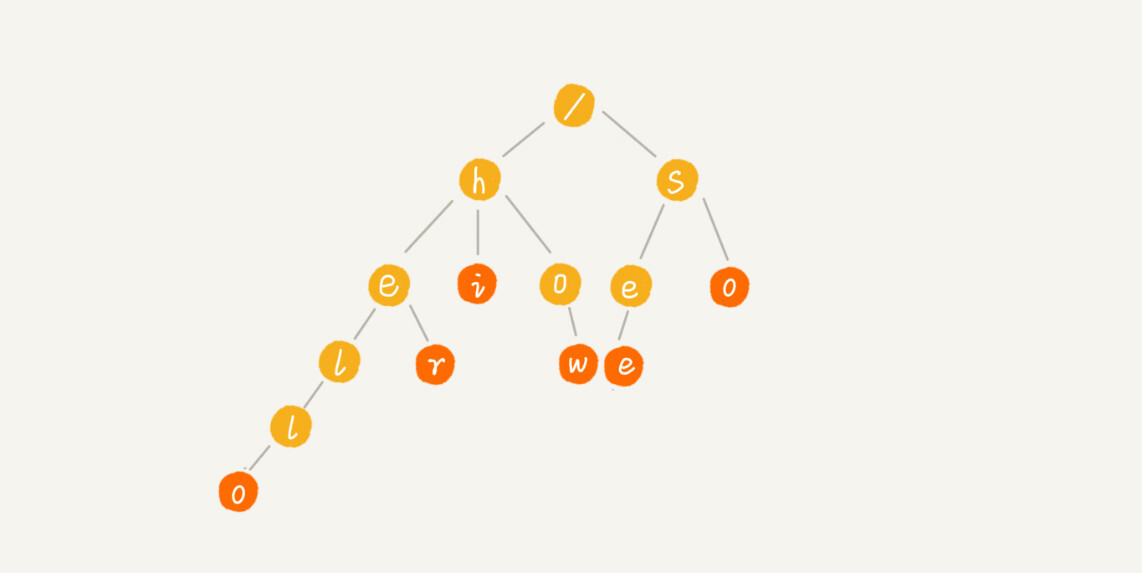
构建TrieTree
public class Trie {

    private TrieNode root = new TrieNode('/');

    public void insert(char[] text) {
        TrieNode p = root;
        for (int i = 0; i < text.length; i++) {
            int index = text[i] - 'a';
            if (p.children[index] == null) {
                TrieNode newNode = new TrieNode(text[i]);
                p.children[index] = newNode;
            }
            p = p.children[index];
        }
        p.isEndingChar = true;
    }

    public boolean find(char[] pattern) {
        TrieNode p = root;
        for (int i = 0; i < pattern.length; i++) {
            int index = pattern[i] - 'a';
            if (p.children[index] == null) {
                return false;
            }
            p = p.children[index];
        }
        if (p.isEndingChar == false) return false; // 不能完全匹配
        else return true;
    }


    public class TrieNode {

        public char data;

        public TrieNode[] children = new TrieNode[26];

        public boolean isEndingChar = false;

        public TrieNode(char data) {
            this.data = data;
        }
    }

    public static void main(String[] args) {
        Trie trie = new Trie();
        String[] strs = {"hello", "her", "hi", "how", "see", "so"};
        for (String str : strs) {
            trie.insert(str.toCharArray());
        }

        boolean b1 = trie.find("hello".toCharArray());
        boolean b2 = trie.find("he".toCharArray());
        System.out.println(b1); // true
        System.out.println(b2); // false
    }
}
在业务中的应用
业务背景: 在页面中有一份表单(包含单选、多选等等题目),根据业务场景抽向成模板、表单、数据单元,其中数据单元代表一个题目(例如单选题、多选题、填空题等),表单是一类多个数据单元的集合,模板是一类多个表单的集合,再将这三个关键对象都简化成如下对象(实际的业务对象每个都不同,但是有共同的点)
public class FormNode {

    private String path;

    private Object data;

    private List<FormNode> children;
  	// setter and getter
}
业务需求: 传入一个路径,例如: "模板一_表单A_数据单元a2",和已构建好的树,返回路径对应的对象
实现:
public static FormNode find(FormNode template, String path) {
        String[] indexes = path.split("_");

        FormNode p = template;
        for (int i = 1; i < indexes.length; i++) {
            String index = indexes[i];
            Map<String, FormNode> childrenMap = p.getChildren().stream().collect(Collectors.toMap(FormNode::getPath, Function.identity()));
            if (!childrenMap.containsKey(index)) {
                return null;
            }
            p = childrenMap.get(index);
        }
        return p;
    }

    public static void main(String[] args) {
        // 构建一个简单的树对象
        FormNode template = new FormNode();
        template.setPath("模板一");

        FormNode form1 = new FormNode();
        form1.setPath("模板A");

        FormNode data1 = new FormNode();
        data1.setPath("数据单元a1");
        FormNode data2 = new FormNode();
        data2.setData("Hello");
        data2.setPath("数据单元a2");

        form1.setChildren(List.of(data1, data2));

        FormNode form2 = new FormNode();
        form2.setPath("表单B");
        template.setChildren(List.of(form1, form2));

        FormNode result = find(template, "模板一_模板A_数据单元a2");
        System.out.println(result.getData()); // Hello
    }